















































































You know how it goes.
A new Thumbtack lead comes in while you are driving to a job, talking to a customer, or trying to finish the work in front of you. You want to reply quickly, but stopping what you are doing every time your phone buzzes is not always possible.
Then, when you finally get a free moment, you have several messages to read, answer, and follow up on, which can make a busy day even harder to manage.
A Thumbtack auto-responder can take care of much of this routine work for you, so you do not have to keep checking your phone throughout the day. It can respond to new leads, gather key details, follow up, and help with bookings while you stay focused on your work.
Here is how it can save you time.
Reply To New Thumbtack Leads Without Picking Up Your Phone
Imagine you are halfway through a job when a new Thumbtack inquiry comes in. You may see the notification, but stopping to read the request, think of a reply, and type it out can break your focus. A Thumbtack auto responder helps by handling that first response for you.
Instead of asking yourself, “When can I get back to this lead?” the system can respond as soon as the inquiry arrives. This is especially useful when you spend most of your day on the road, at customer homes, or working with your hands.
You also do not have to keep typing the same basic information for every new customer. With your business details and instructions in place, the responder can give each lead a useful first reply while you keep your attention on the job you are already doing.
Collect Job Details Without Repeated Questions
Getting a new lead is only the beginning. Before you can decide what to do next, you usually need to know more about the job, such as what the customer needs, where the work is located, or when they want it done.
Normally, you would need to ask these questions one by one and then wait for the customer to answer. If you are busy, that conversation can stretch across the day, leaving you with more messages to check when you finally have time.
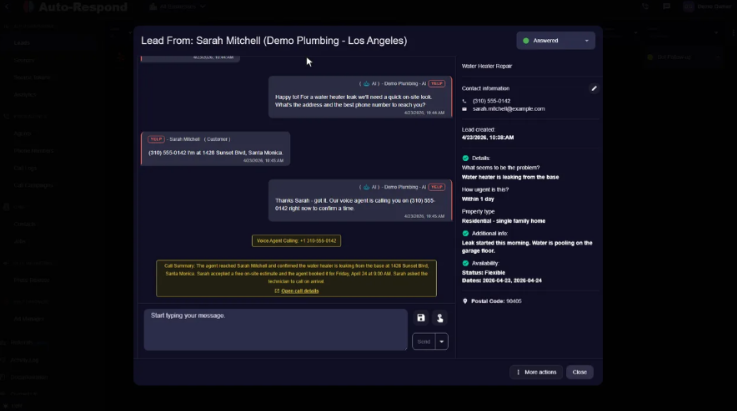
A Thumbtack auto responder can ask the questions you have set up for your business and collect those details as the conversation continues. That means when you step in, you can spend less time figuring out the basics and more time deciding how you can help the customer.
Automate Follow-Ups Instead of Chasing Leads
Have you ever meant to follow up with a lead but got pulled into another job and forgot?
It happens easily when you are managing customers, travel, appointments, and the actual work all at once. Yet going back through old conversations just to find out who needs a reply can take a surprising amount of time.
A Thumbtack auto responder can handle scheduled follow-ups for you instead. Rather than setting reminders for every conversation, you can create a follow-up process that sends messages at planned times when a lead has not responded.
This means you do not have to keep a mental list of every person you contacted during the week. The conversation can continue without you manually checking each lead, while you remain free to focus on current customers and the work that needs your attention now.
Let Customers Book Appointments Automatically
Scheduling can also eat into your day, especially when a simple appointment turns into several messages. You may suggest a time, wait for a reply, offer another option, and then send one more message to confirm everything.
When appointment booking is included in the lead process, you can reduce much of that back-and-forth. Customers can move toward a suitable appointment while the automated system handles the routine parts of the conversation.

That gives you fewer scheduling messages to deal with when you are busy. Instead of spending your time arranging every small detail, you can step in when your input is actually needed and keep your attention on the jobs you have already agreed to complete.
Handle Lead Conversations Automatically While You Work

The biggest time-saving comes from not having to watch your Thumbtack inbox all day. A lead may send a question, provide more information, or need a reminder before they are ready to book, and handling every message yourself can quickly become a distraction.
With automation, those early conversations can keep moving while you get on with your work. The responder can use the business information and instructions you provide to manage routine parts of the conversation, so you do not need to be available for every message.
You can then step in when a customer needs your personal attention rather than replying to every simple inquiry yourself. In a busy service business, that difference can give you more uninterrupted time to complete jobs, serve customers, and handle the parts of your business that only you can manage.
Conclusion
A Thumbtack auto responder saves time by taking routine lead tasks off your daily list. Instead of stopping your work to reply, ask basic questions, send reminders, or manage simple booking conversations, you can let automation handle those steps while you stay focused.
That does not mean you have to step away from your customers. It simply means you can choose when to get involved instead of being interrupted by every new message, giving you a smoother way to manage leads during a busy workday.